241105 CSharp字符串留用、IL,还有在Unity中的应用
前言
最近读《CLR via C#》的时候发现C#有个“字符串留用”机制,它大致是这么个状况:
- C#中的string是引用类型,并且不可更改,只是C#对它动了一点手脚,好让它用起来像个值类型,更加符合直观,例如:
-
用类似以下方式重载了==操作符与Equals方法:
public static bool operator == (String a, String b) {
    return String.Equals(a, b);
}

public static bool Equals(String a, String b)
{
    if ((Object)a == (Object)b) return true; // 先检查是否引用同一个对象
    if ((Object)a == null || (Object)b == null) return false; // 再看是否有一侧为空
    if (a.Length != b.Length) return false; // 长度不等内容必定不同

    return EqualsHelper(a, b); // 最后交给EqualsHelper进行逐字对比
}
判断字符串内容是否一致,只需使用==,不需要刻意去写以下代码:
str1.equals(str2); -
重载了GetHashCode方法,保证两个内容相同的字符串在一次运行时中返回相同的哈希码,即使它们是不同对象的引用;而在引用类型的默认实现中,对于不同对象的引用,该方法返回不同的值。这一点在Dictionary中很重要。
-
- 当我们写出以下代码:
string str1 = "My", str2 = "Str";
str1 += str2;
其实内存是这么分配的:
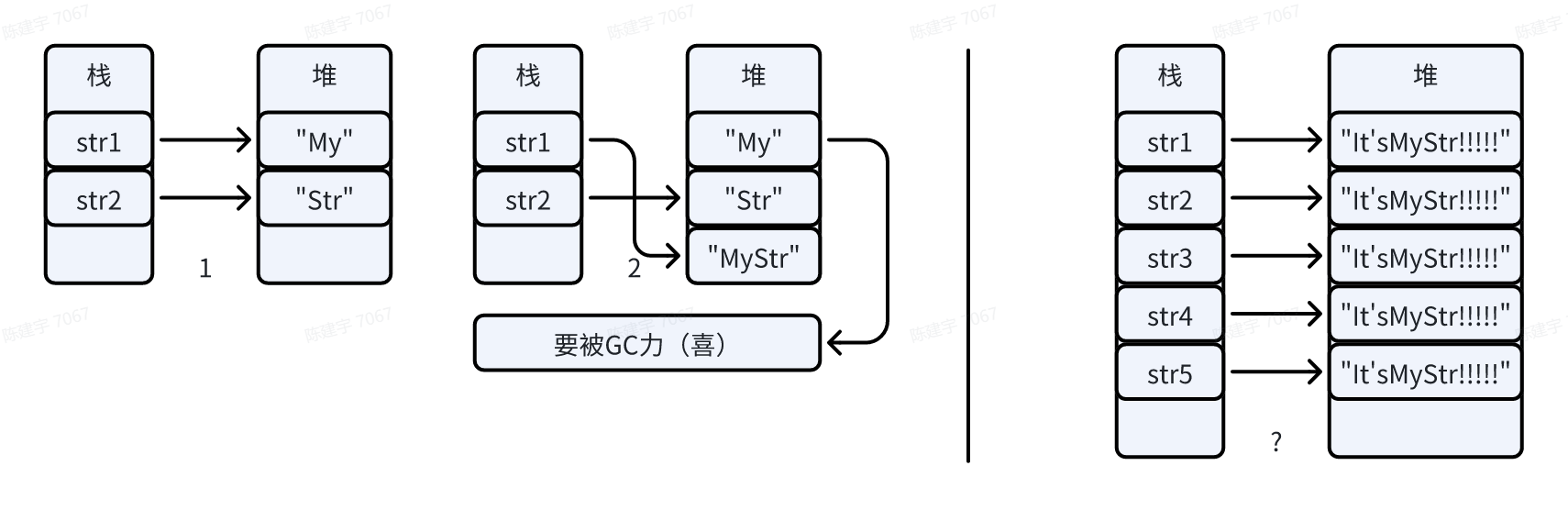
那么,假如我们定义了许多字符串,其内容都是"It'sMyStr!!!!!",这样一大堆堆空间岂不是白白浪费了吗?
- 幸好巨硬早就想到了这一点,它允许在CLR启动时构建一个字符串拘留池,其工作方式类似于字典,可以通过字符串的内容(依照书中的说法,是通过GetHashCode方法)从托管堆中索引到唯一的对象。托管堆再也不用担心我创建太多对象了(?)
接下来会在.NET8.0环境下进行一点基础的比较,再去Unity中模拟实际使用场景。让我们看看接下来会发生什么。
基础
程序
比较程序如下:
using System.Diagnostics;

string tag = "this is a tag";
string somestr = "this is a tag";

int target = 87540721, cnt = 0;
Stopwatch stopwatch = new Stopwatch();
stopwatch.Start();

for (int i = 0; i < target; i++)
    if (ReferenceEquals(tag, somestr))
        cnt++;

stopwatch.Stop();
Console.WriteLine($"{stopwatch.Elapsed},ReferenceEquals,{cnt > 0}");

cnt = 0;
stopwatch.Reset();
stopwatch.Start();

for (int i = 0; i < target; i++)
    if (string.Equals(tag, somestr))
        cnt++;

stopwatch.Stop();
Console.WriteLine($"{stopwatch.Elapsed},Equals,{cnt > 0}");

cnt = 0;
stopwatch.Reset();
stopwatch.Start();

for (int i = 0; i < target; i++)
    if (tag == somestr)
        cnt++;

stopwatch.Stop();
Console.WriteLine($"{stopwatch.Elapsed},==,{cnt > 0}");
之后干的事仅涉及tag与somestr的修改
string
string tag = "this is a tag";
string somestr = "this is a tag";

使用相同的内容对tag和somestr进行初始化,ReferenceEquals方法返回true,表明两者是同一个对象的引用,并且ReferenceEquals方法快于Equals与==。
string.Format
string tag = "this is a tag";
string somestr = string.Format("this is a tag");

使用相同的内容对tag和somestr进行初始化,只是后者的内容是string.Format方法的返回值,ReferenceEquals方法不出意料地返回false,表明两者不是同一个对象的引用,字符串拘留池此时并没有工作。ReferenceEquals方法显著快于Equals与==,可惜无法达到理想中的效果,就像在Java中写的str1==str2。有没有什么方法,可以让后者重新指向池中的对象呢?
string.Intern
string tag = "this is a tag";
string somestr = string.Intern(string.Format("this is a tag"));

有没有什么方法,可以让后者重新指向池中的对象呢?
有的,string.Intern就是这个方法。现在,程序的表现基本和一开始一样了。截至目前,ReferenceEquals方法取得完全胜利!
const string
const string tag = "this is a tag";
const string somestr = "this is a tag";

前两个方法表现如常,==居然反杀ReferenceEquals了!这是怎么回事呢?
想必已经有读者反应过来了:“一定是编译器干的!”
好吧,那就让我们进入C:\Program Files (x86)\Microsoft SDKs\Windows\v10.0A\bin\NETFX 4.8 Tools,打开ildasm.exe,把编译后的程序拖进ildasm窗口,看看编译器都干了哪些好事吧。
IL
什么是IL
经常打包的读者(?)会注意到有个叫IL2CPP的选项,其中“CPP”指的是C++,“2”指的是“to”。
那么这个“IL”指的是什么呢?
让我们看看官方怎么说吧:
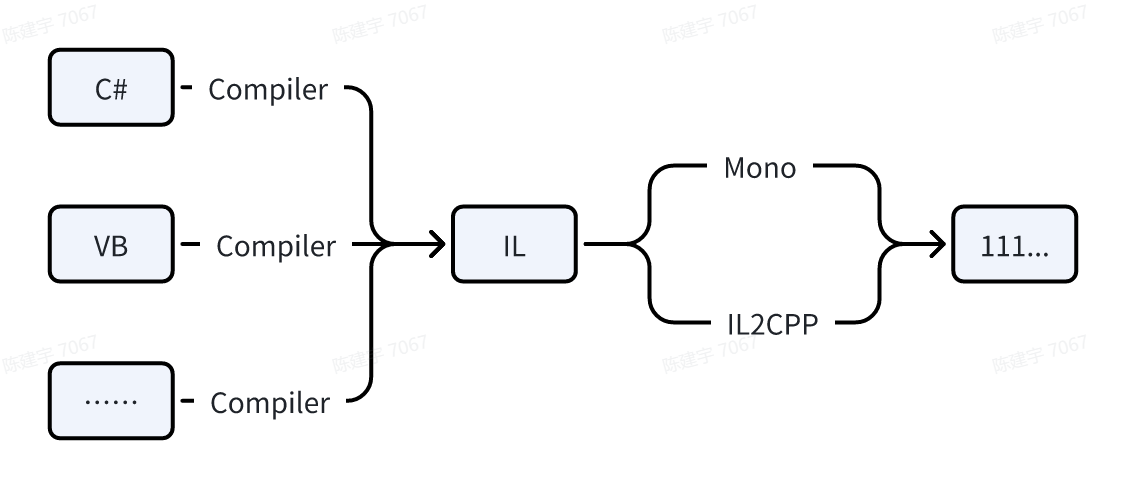
What is "Intermediate Language" (or IL for short)? It is a product of compilation of code written in high-level .NET languages. Once you compile your code written in one of these languages, you will get a binary that is made out of IL. It is important to note that the IL is independent from any specific language that runs on top of the runtime; there is even a separate specification for it that you can read if you're so inclined.
简而言之就是这么一张图:
看看IL
IL是个乍一看很像汇编,读起来却比汇编轻松多了的语言。
string.Format
以string.Format那时的程序为例——
首先它定义了堆栈大小与一些局部变量:
.maxstack  3
.locals init (string V_0, // tag
              string V_1, // somestr
              int32 V_2, // target
              int32 V_3, // cnt
              class [System.Runtime]System.Diagnostics.Stopwatch V_4,
              int32 V_5, // i
              bool V_6, // 辅助变量
              bool V_7, // 辅助变量
              valuetype [System.Runtime]System.Runtime.CompilerServices.DefaultInterpolatedStringHandler V_8,
              // 处理 $"{stopwatch.Elapsed},str,{cnt > 0}" 用的东西
              int32 V_9,  // i
              bool V_10, // 辅助变量
              bool V_11, // 辅助变量
              int32 V_12, // i
              bool V_13, // 辅助变量
              bool V_14) // 辅助变量
然后开始初始化:
IL_0000:  ldstr      "this is a tag" // 加载字符串对象,推送至堆栈
IL_0005:  stloc.0 // 将栈顶值取出至指定变量
IL_0006:  ldstr      "this is a tag"
IL_000b:  call       !!0[] [System.Runtime]System.Array::Empty<object>()
IL_0010:  call       string [System.Runtime]System.String::Format(string,
                                                                  object[])
IL_0015:  stloc.1
IL_0016:  ldc.i4     0x537c3f1 // 将87540721推送至堆栈
IL_001b:  stloc.2
IL_001c:  ldc.i4.0
IL_001d:  stloc.3
IL_001e:  newobj     instance void [System.Runtime]System.Diagnostics.Stopwatch::.ctor()
// 创建一个Stopwatch对象
  IL_0023:  stloc.s    V_4
- 这里有一些有趣的点,例如:
- 同样是引用类型,创建一个string类型变量时,使用的指令是ldstr;而Stopwatch则使用newobj,可见这里对string做了点特殊处理。
- 对比IL_0016与IL_001c处指令,可以发现IL对于加载0(其实是0~8)的情况做了优化,不信可以看看它们的下一行分别隔了多长。
之后值得关注的是if语句中的判断变成了什么东西
-
这是ReferenceEquals:
IL_0032: ldloc.0 // 将指定变量放到堆栈上 IL_0033: ldloc.1 IL_0034: ceq // == IL_0036: stloc.s V_6- 并没有出现call指令。
- 如果没猜错的话,它非常简单粗暴地比较了两个引用变量的地址,然后把结果送给了V_6(一个意义不明的bool类型辅助变量,因为下一条指令就是把它放回栈顶作为跳转指令的判断条件,并且之后再也没出现过这个变量)。
-
这是Equals:
IL_00af: ldloc.0 IL_00b0: ldloc.1 IL_00b1: call bool [System.Runtime]System.String::Equals(string, string) IL_00b6: stloc.s V_10- 传入两个参数,然后出现了一个方法调用。
-
这是==:
IL_012e:  ldloc.0
IL_012f:  ldloc.1
IL_0130:  call       bool [System.Runtime]System.String::op_Equality(string,
                                                                      string)
IL_0135:  stloc.s    V_13
const string
你已经熟悉IL代码了,接下来让我们看看反常的const string的IL代码吧!
首先看看局部变量:
.locals init (int32 V_0, // target
              int32 V_1, // cnt
              class [System.Runtime]System.Diagnostics.Stopwatch V_2,
              int32 V_3,
              bool V_4,
              bool V_5,
              valuetype [System.Runtime]System.Runtime.CompilerServices.DefaultInterpolatedStringHandler V_6,
              int32 V_7,
              bool V_8,
              bool V_9,
              int32 V_10,
              bool V_11,
              bool V_12)
怎么回事,开头两个string哪儿去了?
让我们快进到ReferenceEquals的位置去:
  IL_0019:  ldstr      "this is a tag"
  IL_001e:  ldstr      "this is a tag"
  IL_0023:  ceq
  IL_0025:  stloc.s    V_4
原来加载字符串的操作直接出现在了常量被使用的位置,不再有变量这个中间商来赚差价了!
Equals方法也没有什么特殊的地方,那么==呢?
  // ldstr      "this is a tag"
  // ldstr      "this is a tag"
  // call       bool [System.Runtime]System.String::op_Equality(string,
  //                                                            string)
  // stloc.s    V_8
是的,全是我添加的注释,已经没有多余的比较操作了,现在的IL代码等效于以下C#代码:
for (int i = 0; i < target; i++) cnt++;
这就是编译器干的好事。
小结
- 如果我们可以做到让所有相同的string指向同一个对象,那么使用ReferenceEquals往往是最优的,即便不是,性能也相差无几。
- 不推荐string.Equals(string lhs, string rhs)进行简单的比较,除非要执行忽略大小写的比较以及包含语言文化的比较,可以用到它的重载。
- ==是个符合直观且普遍可行的做法,并且在两边都是const string(这又是什么神奇的应用场景?)时可以被编译器优化掉。
应用
调用函数时const是否有效
比较时调用的函数:
bool CmpStr(string lhs, string rhs, CmpFunc func)
{
    switch (func)
    {
        case CmpFunc.Operator:
            return lhs == rhs;
        case CmpFunc.Equals:
            return string.Equals(lhs, rhs);
        case CmpFunc.ReferenceEquals:
            return ReferenceEquals(lhs, rhs);
        default: return false;
    }
}
参数定义:
const string cs1 = "ItsMyStr", cs2 = "ItsMyStr";
const int strCnt = 1919810; // 比较次数
结果如下:
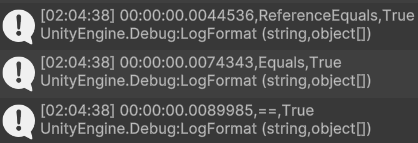
函数的参数就已经是不带const的局部变量了,当然是无效的。
Unity序列化的参数是否经过字符串留用
定义一个参数:
[SerializeField] string input;
在Inspector窗口输入"ItsMyStr",将它与cs1比较,结果如下:
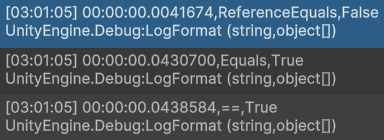
如你所见,并未留用,而且比较速度显著减缓。
不过我们有显式留用的方法,只需要在比较前这么做:
input = string.Intern(input);
结果如下:
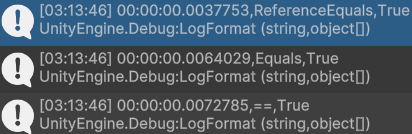
Tag相关
tag相关的东西有点特殊,因为tag是GameObject上的属性,而如这篇文章所言,GameObject本身就有其特殊性。
一开始试过使用tag=="ItsMyTag"比较87540721次,发现Unity卡死了,而且内存很快就被占满了(相应的,CompareTag方法就不会占用多余的内存),后来老老实实把比较次数改成了114514。
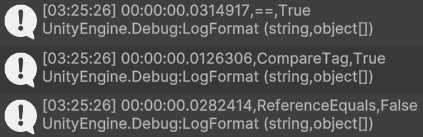
tag同样是个未经留用的字符串,读取tag时会在C#侧造成内存分配,最好的比较方式无疑是GameObject提供的CompareTag,不读取tag而是由C++侧进行比较。
小结
- 传参时,const string被视作普通的string处理。不过定义常量至少还是会省去一次初始化的过程。如果有什么变量是确信之后不会发生变化的,可以试着将其定义为常量。C#编译器不会帮你判断哪些变量的值直到哪一步前都可以在编译期确定,但是对于一个常量,它会放心大胆地传播。
- Unity序列化的参数并未经过字符串留用,不过可以尝试在Awake之类的方法中使用string.Intern显式留用字符串,如果不嫌麻烦的话。并且,由于==与string.Equals的第一步就是比较两字符串的引用,一系列判断之后才进行逐字符比较,所以即便不使用ReferenceEquals方法,也能略微提升性能。
突然发现自己当时居然没测内存,明明这才是Intern的重点来着(
- 直接访问GameObject的tag与name都会带来额外的开销,而tag有着不会造成内存损耗的CompareTag方法,所以建议将频繁用于比较的字符串作为物体的tag,避免直接访问tag,多用CompareTag方法。